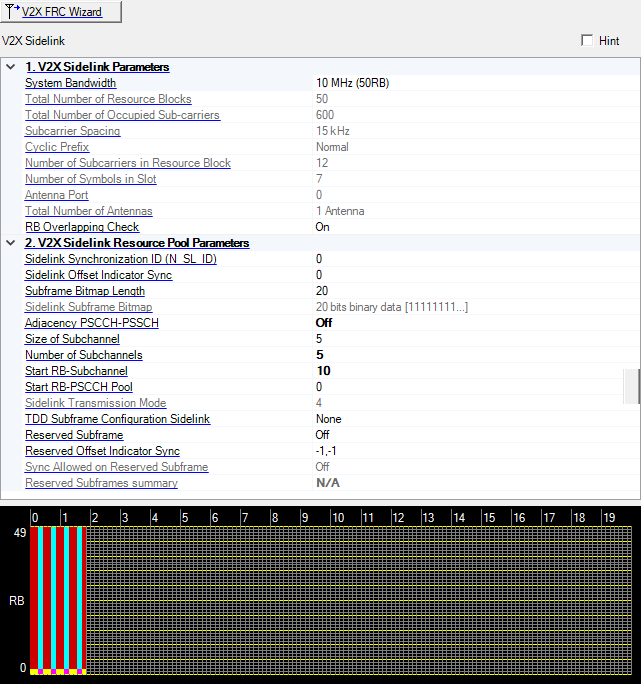
Choice: 1.4 MHz (6RB) | 3 MHz (15RB) | 5 MHz (25RB)) | 10 MHz (50RB) | 15 MHz (75RB) | 20 MHz (100RB)
Default: 10 MHz (50RB)
Use the drop-down menu to set the system bandwidth and number of Resource Blocks (RB).
When the system bandwidth is changed, the software automatically adjusts the value in the Total Number of Resource Blocks cell, the Total Number of Occupied Sub-carriers cell, and so on.
Note: The resource blocks and some parameters are reconfigured by changing the System Bandwidth parameter.
In the case (1) or (2), auto configuration is done for Frequency Offset.
(1) When any action, “Add CC”, “Delete CC”, “Copy CC”, or Change System BW is done, and Auto Carrier Aggregation Configuration is on.
(2) When Auto Carrier Aggregation Configuration is changed to on from off.
If Auto Carrier Aggregation Configuration is set to off, auto configuration does not work.
Displays the total number of resource blocks in this carrier.
See 3GPP TS 36.211 9.2.3 for more information.
Displays the total number of occupied subcarriers in this carrier.
See 3GPP TS 36.211 9.2.3 for more information.
Displays the subcarrier spacing in this carrier.
See 3GPP TS 36.211 9.2.3 for more information.
Displays Cyclic Prefix.
Only normal cyclic prefix is supported for V2X sidelink communications.
See 3GPP TS 36.211 9.2.1 and 9.2.3 for more information.
Displays the number of consecutive subcarriers in a resource block.
See 3GPP TS 36.211 9.2.3 for more information.
Displays the number of consecutive SC-FDMA symbols in a slot.
The last SC-FDMA symbol in a sidelink subframe serves as a guard period and shall not be used for sidelink transmission.
See 3GPP TS 36.211 9.2.3 and 9.2.5 for more information.
Displays the antenna port.
Displays the total number of antennas.
Choice: Off | On
Default: On
Double-click or use the drop-down menu to turn this parameter on or off.
When it is on, it works before signal generation.
If it is set to on and overlapping resource blocks are found, signal generation is aborted.
Range: 0 to 335
Default: 0
Enter the value of sidelink synchronization ID.
See 3GPP TS 36.211 9.7 for more information.
Range: 0 to 159
Default: 0
Enter the value of sidelink offset indicator synchronization.
For V2X sidelink communication, synchronisation resources are present in those SFN and subframes which satisfy the relation: (SFN*10+ Subframe Number) mod 160 = SL-OffsetIndicatorSync.
See 3GPP TS 36.331 6.3.8 for more information.
Choice: depends on TDD Subframe Configuration
None: 16 | 20 | 100
0: 60
1: 40
2: 20
3: 30
4: 20
5: 10
6: 50
Default: 20
Double-click or use the drop-down menu to select the length of Sidelink Subframe Bitmap.
See 3GPP TS 36.331 6.3.8 for more information.
Displays the sidelink subframe bitmap.
Indicates the subframe resources used for sidelink.
See 3GPP TS 36.331 6.3.8 for more information.
Choice: Off | On
Default: On
Double-click or use the drop-down menu to turn this parameter on or off.
When it is set to on, a UE shall always transmit PSCCH and the corresponging PSSCH in adjacent RBs in a subframe.
See 3GPP TS 36.213 14.1.1.4C and 14.2.4 for more information.
Choice:
5 | 6 | 10 | 15 | 20 | 25 | 50 | 75 | 100 (Adjacency PSCCH-PSSCH: on)
4 | 5 | 6 | 8 | 9 | 10 | 12 | 15 | 16 | 18 | 20 | 30 | 48 | 72 | 96 (Adjacency PSCCH-PSSCH: off)
Default: 5
Double-click or use the drop-down menu to select the number of PRBs of each subchannel in the corresponding resource pool.
See 3GPP TS 36.213 14.1.1.4C, 14.1.5, 14.2.4, and 36.331 9.3.2 for more information.
Choice: 1 | 3 | 5 | 8 | 10 | 15 | 20
Default: 5
Double-click or use the drop-down menu to select the number of subchannels in the corresponding resource pool.
See 3GPP TS 36.213 14.1.1.4C, 14.1.5, 14.2.4, and 36.331 9.3.2 for more information.
Range: 0 to maximum RBs - 1
Default: 0
Enter the lowest RB index of the subchannel with the lowest index.
See 3GPP TS 36.213 14.11.4C, 14.1.5, 14.2.4, and 36.331 9.3.2 for more information.
Range: 0 to maximum RBs - 1
Default: 0
Enter the lowest RB index of the PSCCH pool only when Adjacency PSCCH-PSSCH is off. Otherwise invisible.
See 3GPP TS 36.213 14.2.4, and 36.331 9.3.2 for more information.
Displays the sidelink transmission mode.
See 3GPP TS 36.213 14.1.1.4C, 14.1.5, 14.2.4, and 36.331 9.3.2 for more information.
Choice: None | 0 | 1 | 2 | 3 | 4 | 5 | 6
Default: None
Double-click or use the drop-down menu to select the TDD subframe configuration.
See 3GPP TS 36.213 14.1.1.4C, 14.1.5, 14.2.4, and 36.331 9.3.2 for more information.
Choice: Off | On
Default: Off
Double-click or use the drop-down menu to turn this parameter on or off.
When this parameter is set to On, the SLSS, DSSF, and reserved subframes are excepted from counting PSSCH subframe pool index t_SL_k.
See 3GPP TS 36.213 14.1.5, TS 36.211 9.2.4 and 9.8 for more information.
Range: -1 to 159
Default: -1,-1
Specifies 2 sets of reserved Sidelink offset indicator synchronization for other UE to use for SLSS transmission. -1 indicates it’s not configured.
When this indicator is configured, subframes which satisfy: (SFN*10+ Subframe Number) mod 160 = SL-OffsetIndicatorSync, are counted in N_slss and reserved not to use for transmission.
See 3GPP TS 36.331 9.3.2, TS 36.213 14.1.5 for more information.
Choice: Off | On
Default: Off
Double-click or use the drop-down menu to turn this parameter on or off.
When this parameter is set to On, the SLSS resources shall be present on the 256ms cycle reserved subframes. Subframe Bitmap Length is changed to 100.
This parameter is not a part of 3GPP spec.
Displays summary of reserved subframes related information.
See 3GPP TS 36.213 14.1.5 for more information.
The resource mapping graph displays how resource blocks are allocated for your current channel configuration. For more information, see Resource Mapping Graph.